🍒 Cherry-Picked Nx v19.4 Updates
Exploring My Selected Features from Nx Releases
 Jonathan Gelin
[🌊 Nx Core]
Dependency Only Target
In your project configuration, you can now declare a target with only the dependsOn property:
{
  "name": "my-project",
  "targets:": {
    "my-target":{
      "dependsOn": ["..."]
    }
  }
}
Now you can group the execution of many different targets into a single one without having to use the nx:command executor:
{
  "name": "my-project",
  "targets:": {
    "test":{
      "dependsOn": ["integration-test", "unit-test"]
    },
    "integration-test":{
      "executor": "..."
      "dependsOn": ["targets-deps"]
    },
    "unit-test":{
      "executor": "..."
      "dependsOn": ["targets-deps"]
    }
  }
}
You can also simplify the duplication of the dependsOn configurations by grouping it into a single target:
{
  "name": "my-project",
  "targets:": {
    "before-build":{
      "dependsOn": ["^openapi-generation", "..."]
    },
    "build":{
      "executor": "..."
      "dependsOn": ["before-build"]
    },
    "serve":{
      "executor": "..."
      "dependsOn": ["before-build"]
    }
  }
}
Ability to split long Nx single command
If you are using the nx:run-commands executor with a long command like:
"start-dev": {
  "executor": "nx:run-commands",
  "options": {
    "command": "docker compose -f .docker/compose/docker-compose.services.yml -f .docker/compose/docker-compose.dev.yml --project-directory . up -d"
  }
}
You can now make your configuration more readable by splitting it:
"start-dev": {
  "executor": "nx:run-commands",
  "options": {
    "command": [
      "docker compose -f",
      ".docker/compose/docker-compose.services.yml -f",
      ".docker/compose/docker-compose.dev.yml",
      "--project-directory . up -d"
    ]
  }
},
[🧩 Plugins]
Add View Provider utility for Angular component
If you were adding the viewProviders configuration in your custom Angular component generators, you replace that code now with the new utility addViewProviderToComponent:

Support Composite Build for Gradle
Nx continues the Gradle support by including more features such as the Composite Builds:
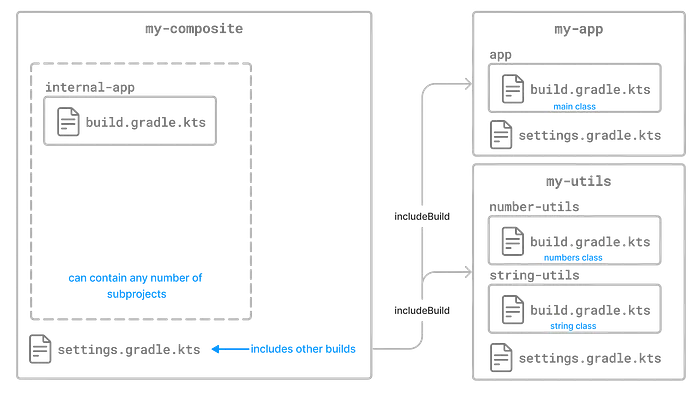
Composite builds allow you to:
-
Combine builds that are usually developed independently, for instance, when trying out a bug fix in a library that your application uses.
-
Decompose a large multi-project build into smaller, more isolated chunks that can be worked on independently or together as needed.
[💎 Project Crystal]
Convert to Inferred Generators
On the release blog related to Nx v19, I talked about the convert-to-inferred generator for:
nx g @nx/eslint:convert-to-inferred
nx g @nx/playwright:convert-to-inferred
nx g @nx/cypress:convert-to-inferred
These generators will remove the configurations from your project.json that are covered by Nx plugins.
Now you can also use that generator on many other plugins:
nx g @nx/vite:convert-to-inferred
nx g @nx/webpack:convert-to-inferred
nx g @nx/jest:convert-to-inferred
nx g @nx/storybook:convert-to-inferred
nx g @nx/remix:convert-to-inferred
nx g @nx/rollup:convert-to-inferred
nx g @nx/next:convert-to-inferred
⚠️ If you want to use @nx/webpack:convert-to-inferred, you’ll first need to migrate to the NxWebpackPlugin (see below).
Also, if you want to run the generators based on the installed plugins, you can use the command:
npx nx g convert-to-inferred
? Which generator would you like to use? …
  @nx/cypress:convert-to-inferred
  @nx/eslint:convert-to-inferred
  ...
If you don’t know what inference means, please read my article 💎 Discovering Nx Project Crystal’s Magic.
Convert to Webpack Plugin
If you are using custom Wepack configurations, I recommend having a look at the generator:
nx g @nx/webpack:convert-config-to-webpack-pluginThis generator will convert withNx Webpack config to a standard config using NxWebpackPlugin which is in charge of injecting Nx configurations like TypeScript support and links to workspace libraries (via tsconfig paths).
[🌐 Nx Cloud]
Nx OnBoarding flow simplified:
[💫 Upgrades]
Upgrade to NgRx 18

Want to go further?
If you're looking to improve your Developer Experience, build AI Frameworks, or optimize your CI/CD pipelines with Nx, feel free to reach out — I'm always happy to share real-world setups and practical tips.

Build on Foundations,
Scale with AI.
I design AI-powered workflows and engineering foundations that make teams faster, happier, and more consistent.