🍒 Cherry-Picked Nx v19.2 Updates
Exploring My Selected Features from Nx Releases
 Jonathan Gelin
[🌊 Nx Core]
Local .env files will override defaults
It is a common usage in VueCli or Next.js to be able to override the .env file by declaring a .env.local. It is now also supported by Nx:
.env.local
.local.env
.env
Do not affect all when touching the lock file
Happy about that one! Until now, when the lock file is modified, all of the projects were affected even for a development library.
Currently, I am patching Nx code to disable that behavior. But with Nx 19.2, you can now use the plugin configuration projectsAffectedByDependencyUpdates in your nx.json:
"pluginsConfig": {
    "@nx/js": {
        "projectsAffectedByDependencyUpdates": 'auto'
    }
}
It can be all, to affect all projects, auto to affect only projects related to the modified dependencies or a string[] to define a list of projects.
Configurable nx reset
By default, the nx reset command is clearing all of the cached Nx artifacts and metadata about the workspace and shuts down the Nx Daemon.
You can now specify what should be reset:
// Clears the Nx Cache directory. This will remove all local cache entries for tasks, but will not affect the remote cache:
nx reset --only-cache

// Stops the Nx Daemon, it will be restarted fresh when the next Nx command is run.:
nx reset --only-daemon

// Clears the workspace data directory. Used by Nx to store cached data about the current workspace (e.g. partial results, incremental data, etc):
nx reset --only-workspace-data
To not mix with the Nx Generated Metadata, now there is a separate Workspace Cache Directory that will contain the cache of the project graph, the plugins, etc.
Override Strategy When Generating Files For Generators
By default, generators overwrite files when they already exist.
But you can now decide to specify a different strategy:
generateFiles(tree,
  join(__dirname, './files'), // srcFolder
  libraryRoot, // targetFolder
  { uppercase, name: schema.name}, // substitutions
  { overwriteStrategy: OverwriteStrategy.KeepExisting } // NEW: options
);-
OverwriteStrategy.Overwrite (default): all generated files are created and overwrite existing target files if any.
-
OverwriteStrategy.KeepExisting: generated files are created only when target file does not exist. Existing target files are kept as is.
-
OverwriteStrategy.ThrowIfExisting: if a target file already exists, an exception is thrown. Suitable when a pristine target environment is expected.
[🧩 Plugins]
Incremental Build for Webpack Plugin
A new interesting field buildLibsFromSource was added to the executor @nx/webpack:webpack to activate incremental build:
"my-app": {
  "targets": {
    "build": {
      "executor": "@nx/webpack:webpack",
      "options": {
        "webpackConfig": "apps/my-app/webpack.config.js",
        "buildLibsFromSource": true // Default to true
      }
    },
    //...
  }
}
To remember what is incremental build, let’s take that simple example:
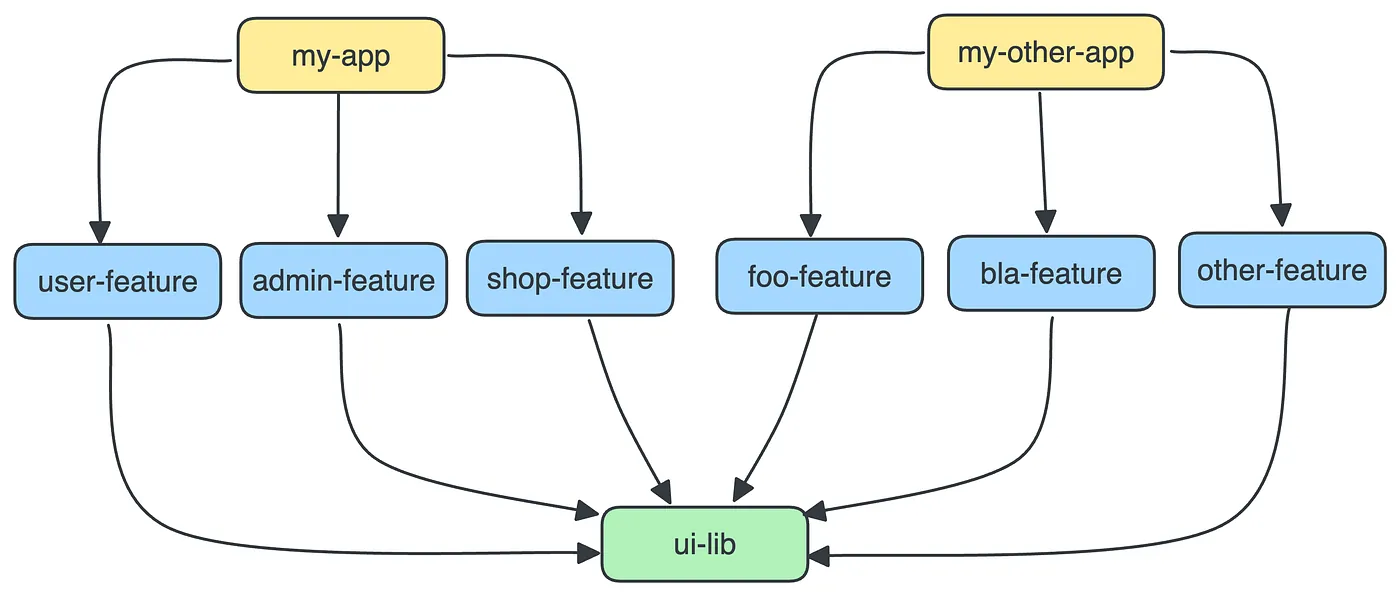
If you use imports between libs and you want to build my-app or my-other-app you’ll have to build all files from all libs:
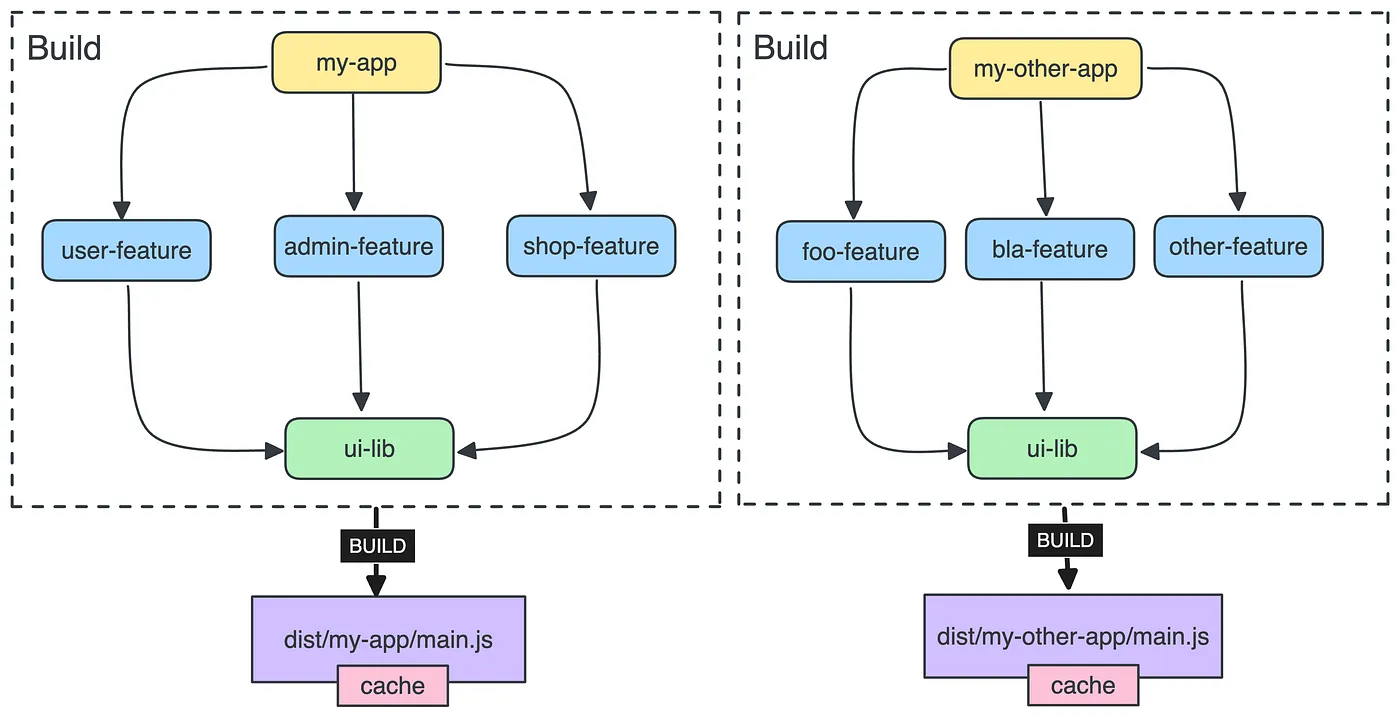
In that use case, each time something is modified in the app, even if ui-lib didn’t change, the entire app is rebuilt including the files in the ui-lib.
But if you use incremental build, you’ll build ui-lib separately:
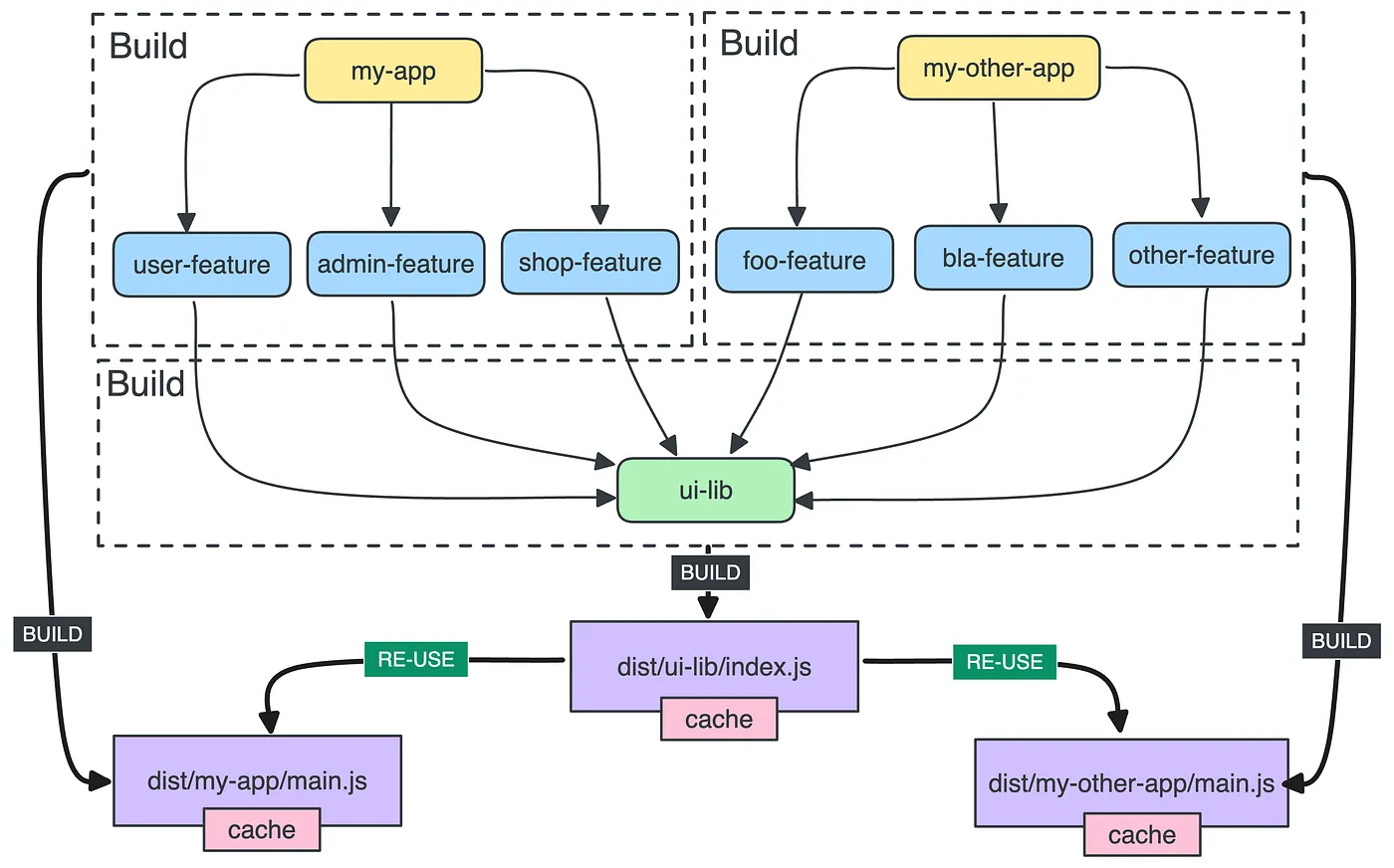
With that approach, we can re-use the bundle of the previous build for the build of my-app or any other app that depends on it.
[💎 Project Crystal]
createNodesV2
If you want to inject configurations in projects dynamically, you have to use the method createNode:
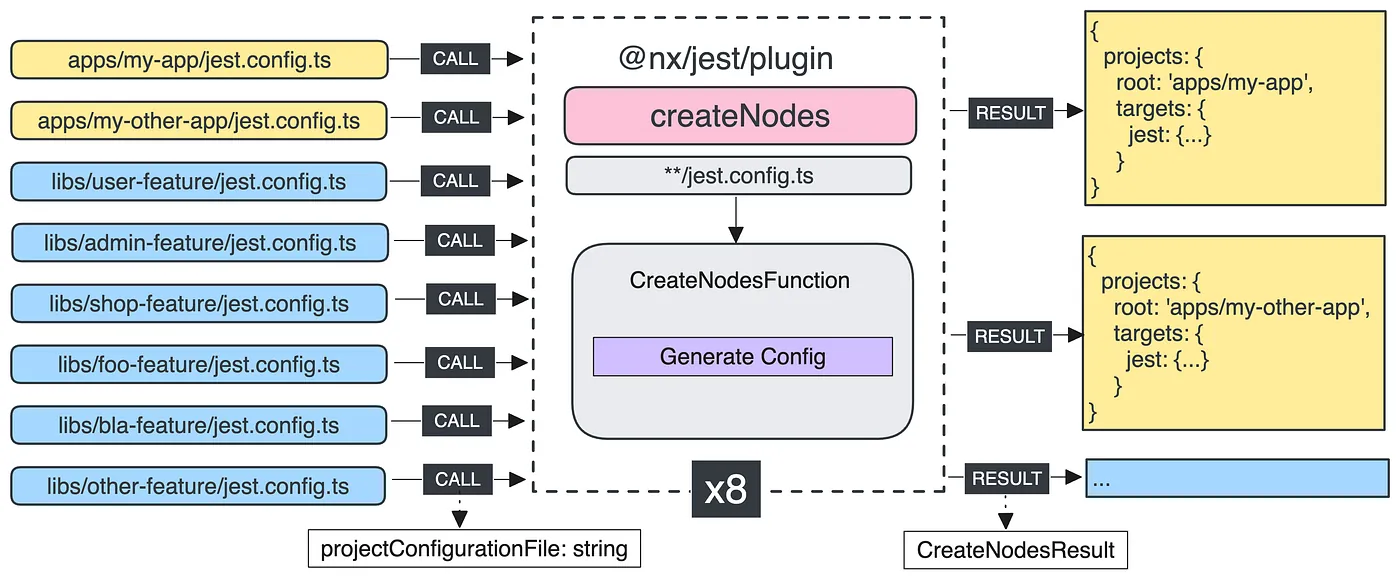
But a new method createNodesV2 and instead of invoking the plugin for each matching file, it runs just once with all files:
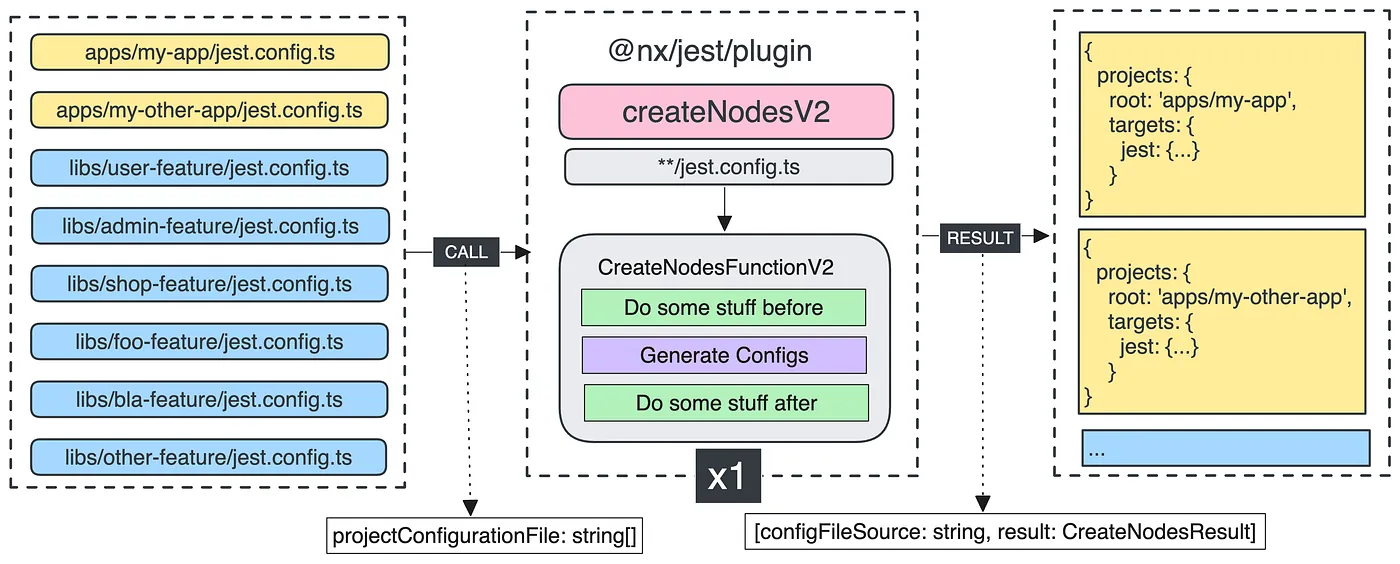
With that approach, you’ll:
-
improve the performance of the plugin’s execution because you can execute common code only once.
-
have more flexibility if you want to run codebefore or after the execution of the plugins.
For more compatibility, you can use the function createNodesFromFiles:
import { createNodesFromFiles, ... } from '@nx/devkit';

// Keep this exported for older versions of Nx.
export const createNodes: CreateNodes = ['**/config.json', processSingleConfigFile];

// Use `createNodesFromFiles` to reuse the logic from `processSingleConfigFile`
export const createNodesV2: CreateNodesV2 = ['**/config.json', async (configFiles, options, context) => {
  // Do some stuff before

  try {
    return await createNodesFromFiles(processSingleConfigFile, configFiles, options, context);
  } finally {
    // Do some stuff after
  }
}
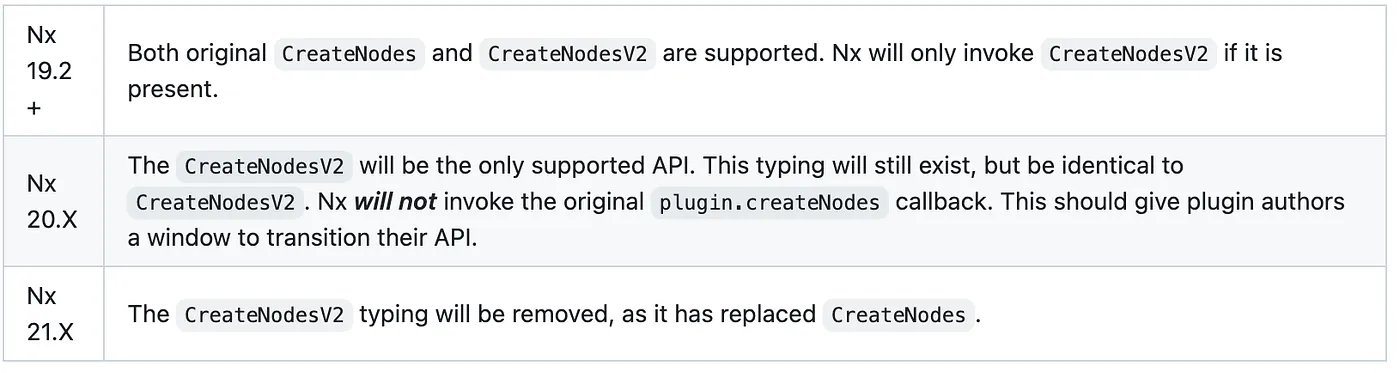
This new function will replace the createNodes function in Nx v21:
More info in the video:

[💫 Upgrades]
Support pnpm v9
Want to go further?
If you're looking to improve your Developer Experience, build AI Frameworks, or optimize your CI/CD pipelines with Nx, feel free to reach out — I'm always happy to share real-world setups and practical tips.

Build on Foundations,
Scale with AI.
I design AI-powered workflows and engineering foundations that make teams faster, happier, and more consistent.